> For the complete documentation index, see [llms.txt](https://wiki.drgnshield.com/llms.txt). Markdown versions of documentation pages are available by appending `.md` to page URLs; this page is available as [Markdown](https://wiki.drgnshield.com/important-concepts/player-shops.md).
# Player Shops
Player shops have a huge impact on Dragon Shield economy we will be teaching you how to make a shop in this section.
## Shop Creation
To create a shop, place down a chest and left-click it with the amount of items you want to sell. For example: If I want to sell 1 stone I need to hold 1 stone in my hand and left-click the chest with it.
Man is selling stone frfr.
You will then be prompted to type in the chat, how much you would like to sell this item for. To change to a buy type shop look at it and do **/qs buy**\
\
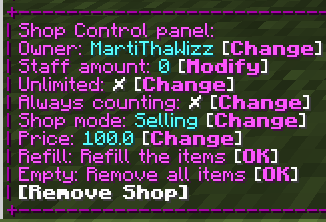
To change shop settings Right-Click on the sign and edit these settings. Very Ez